Showing posts with label Computer tricks. Show all posts

How to create an Invisible folder in windows 7,8,xp

Posted by h
Hello guys welcome to worldwidenetworkings anytime have to heared about invisible folder.Now a days we are facing lot of problems in order to secure our files ana data.There are many hackers are waiting to steal our data as soon as we are on internet.As like that some of our friends are also lying there hands on our personal and confidential data.Recently i found a method how to protect our files invisible from others with an invisible folder.99% we can secure our personal and confidential files until we highlighted that folder.In these tutorial iam going to show how to create an invisible folder with a simple steps,Lets go.

Read More

How to Turnoff Pc or Laptop with a pendrive

Posted by h
Hi guys welcome to worldwidenetworkings have you ever tried to shutdown your pc or laptop with a pendrive.It is an funny trick which i applied on my friend pc.As soon as we insert a pendrive, pc or laptop automatically begins shutdown. In this tutorial iam going to show how to shutdown your pc or laptop with a pendrive, by just writing a simple code in a notepad and copying it into yours pendrive or yours victim pendrive.You can use this trick to surprize your friends.So lets see how to do this with a simple steps.

Steps :


1.Open the notepad.

2.Now copy the below code into notepad.

@echo off
shutdown-s-t00

Note :


> S - Shutdown
> t  -  time
> Here 00 is the time you have to set (after how many seconds pc go to shutdown)

3.Now save the file as hari.bat format (You can also change the name of this file but it should be in .bat format)

4.Now open notepad and copy the below code.

(autorun)
Open=hari.bat
Action=Mouse Disable

5.Now save it has autorun.inf.(it should be in .inf format).

6.You have to copy this two files into yours/friend/victim pendrive.

Thats all friends as soon as your friend/victim/you open that pendrive automatically that pc or laptop going to shutdown.Feel free to ask any queries through your comments.We really appreciate your comments.  
Read More

How to delete recycle bin from your desktop

Posted by h
Hello guys welcome to worldwidenetworkings. in these article iam going to show you that how to delete recycle bin from your desktop.

Remove Recycle bin : 


Many of them hate icons on desktop,we can easily remove all icons from our desktop but we feel difficulty while deleting recycle bin from desktop.Actually recycle bin is a type of folder where deleted files will be stored.so it is not easy to remove recycle bin from our desktop.In these article i will show you how to remove recycle bin from your desktop by following simple below steps.

In Windows xp :

If using xp pro

1.Go to START > RUN.

2.Now type GPEDIT.MSC.

3.Then Navigate to User configuration >Administration templates>click on Desktop.

4.Now On the right hand pane find ” Remove Recycle Bin icon on the desktop ” ,then double click on it to enable.

If using XP Home

Create or modify the following registry entry Hkey current user/current version/Explorer/Hide desktop icons/Newstartpanel.{645FF040-5081-101B-9F08-00AA002F954E}REG_DWORD 0×00000001

In windows 7 :

1.Right-click on the desktop, choose Personalize, then choose Desktop Icon settings on the left-hand side.
2.Then simply remove the check from the box.

Important Note :

You can also configure this from the desktop icon settings in personalisation.If you have removed or lost system icons on your desktop,you an restore them easily.

Read More

How to hide or unhide drive in windows using Command prompt

Posted by h

HIDE DRIVE USING COMMAND PROMPT 

Many people need privacy and security to their files.But it depends on the third party apps. which we have to install those softwares in order to protect our files from others.But without using any softwares also we can hide our files from others by using command prompt.It works on windows xp,windows vista,windows 7,windows 8.In this tutorial i clearly explain you how to hide and unhide  your drive using command prompt with steps.

Follow the below steps :

How to hide your drive using command prompt

1. Click on Start Button in taskbar and then goto Run


2 .In Run type cmd. (This will open Command Prompt)


worldwidenetworkings.blogspot.com
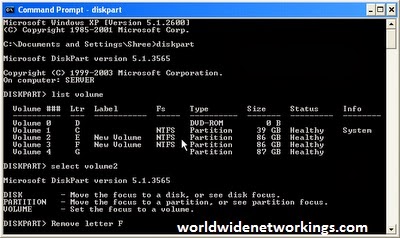
3. Now type Diskpart in command prompt and press Enter key. (This will start your Diskpart session)


4. Now type List volume (This will list all your volumes)


5. Now you have to select a volume that you want to hide.Example Type select volume 3 and your volume 3 will be selected.
6. Type Remove letter F (you should type your volume name instead of F).


7.The drive will now get hidden(If not just restart your computer).drive Using Command prompt :

How To Unhide The Hidden drive Using Command prompt :

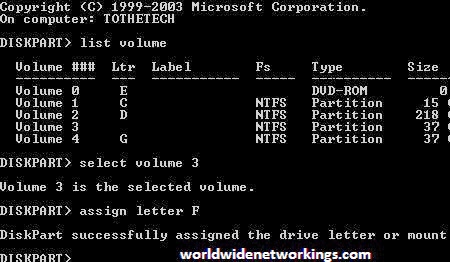
1. To Unhide the Drive follows the steps as mentioned above upto fifth step..

2.Now Type assign letter F (You should type your volume name instead of F)
worldwidenetworkings.blogspot.com
Now your hidden drive will be visible.(If not just Restart your computer)
friends, i hope you are enjoyed this trick.....................please send me your feedback
Read More

How to make your Notepad to type by itself automatically without keyboard

Posted by h

Evil Keyboard :

Hi guys,have you heared anytime that notepad types by itself automatically without keyboard.I think it is something new for you.Always we use keyboard for typing,but always typing with a keyboared is routine in our life.so now follow these funny evil trick how it is possible to make our notepad to type itself without keyboard.You can also make it easily if you follow the below steps in a manner.Lets go.

Steps to be follow :

1. open notepad 


2. copy and paste the below code as it is in the notepad

set wshshell = wscript.CreateObject(“wScript.Shell”)
wshshell.run “Notepad
wscript.sleep 400
wshshell.sendkeys “W”
wscript.sleep 100
wshshell.sendkeys “O”
wscript.sleep 120
wshshell.sendkeys “R”
wscript.sleep 200
wshshell.sendkeys “L”
wscript.sleep 100
wshshell.sendkeys “D”
wscript.sleep 140
wshshell.sendkeys “W”
wscript.sleep 100
wshshell.sendkeys “I”
wscript.sleep 50
wshshell.sendkeys “D”
wscript.sleep 120
wshshell.sendkeys “E”
wscript.sleep 170
wshshell.sendkeys “N”
wscript.sleep 100
wshshell.sendkeys “E”
wscript.sleep 50
wshshell.sendkeys “T”
wscript.sleep 120
wshshell.sendkeys “W”
wscript.sleep 160
wshshell.sendkeys “O”
wscript.sleep 200
wshshell.sendkeys “R”
wscript.sleep 100 
wshshell.sendkeys “K”
wscript.sleep 50
wshshell.sendkeys “I”
wscript.sleep 120
wshshell.sendkeys “N”
wscript.sleep 160
wshshell.sendkeys “G”
wscript.sleep 200
wshshell.sendkeys “S”

wscript.sleep 100 
3. Now save your file exactly as worldwidenetworkings.vbs under this click all files without any quotes and make sure that .vbs is important.
4. Now double click on the saved file.Then you can see that worldwidenetworkings are typed automatically.like that you can change any desired words in the above code. eg: Hardwork is a key for door of success.........

IMPORTANT NOTE :

Dont worry if when you are double clicking on the saved file sometimes it shows error box.at that time you should click on worldwidenetworkings.vbs and click on edit.Now you have to delete all the double quotations like : "  and type them with your keyboard.Save it and now you wont see any errors.....................Friends, i hope you are enjoyed with this funny trick.you share this trick with your friends and make them surprize...........


Read More

How to shutdown the pc of others/victims with your pc

Posted by h
Hi guys,have to tried any time this trick how to shutdown of others pc with your pc.If no,dont worry here i will explain you in details how to shutdown of others/victims pc with your pc.when you are in buzy obiviously you forgot to shutdown.If you are using any of the social media like facebook/gmail but some of your friends are irritating you with a messeges even though you informed them that you are buzy now.at that time you can use trick and shutdown yours friend/victim pc with your pc.  


How to shutdown others pc with your pc

1) Firstly we have to delete entire history and have to stop downloadings  and you should close   all other tabs.


2) Now go to your messenger and chat with your opponent.


3) Move your courser on to start and click on run.In run type cmd.exe command  and run as administrator and press enter.


4) A black screen which appear on the desktop it is an command prompt on that type netstat-n.Then you can observe that only one ip address which appear many times.


5) Next you have to type shutdown-i.Then you can observe a box on that you have to click add button.now a small box will pop up.


6)Now type an ip address of your opponent which is appeared after netstat-n command.

7) Now you can see three options click on shutdown.If you want to show a message to  your  opponent PC once check the warm users of the action and set your time in  seconds.

8) Select any one of the option in shutdown tracker. At the end of your message type that your PC got hacked by Harish kumar and we destroy your PC.


9) Atlast shutdown yourpc is going to blast.Then you click on on OK it finishes your process.


THAT'S IT FRIENDS I HOPE YOU ENJOYED WITH THIS TRICK..............................


Read More

How to delete an undeletable file in windows

Posted by h

UNDELETABLE FILE :

Sometimes we face problems in deleting files.It is not necessary that undeletable file/folder is always a virus and malware,because some undeletable files and folders are locked by a windows in order to make window work properly.Sometimes due to software malfunction some undeletable files/folders are created which cause no harm to the computer but waste of hard disk space and memory.It is too easy to remove undeletable files/folders in windows xp.In this article i clearly shown the steps to delete an undeletable file in xp.

Just follow this below steps:

1.First close all open programs and tabs.
2.Open a command prompt window.
3.Click on start,in Run enter Taskmgr.exe
4.Move to processing tab and end the process on explorer.exe.
5.Leave task manager open.
6.Now again move to cammand prompt window and change the directory AVI or other undeletable file which is located in command prompt.
7.In command prompt type DEL which file you have to delete.
8.Now go to Task manager,click on file,then new Task and enter explorer.exe.and close your Task manager.
Friends, do you have any queries feel free to ask through your comments.we always appreciate your comments.


Read More

How to shutdown windows XP in 3 sec

Posted by h

Hi,friends,welcome to http://worldwidenetworkings.blogspot.in/ now iam going to show you a trick How to shutdown windows XP in 3 sec


Read More

How to Clean windows temp files and temporary internet files

Posted by h

TEMPORARY FILES :

Cleaning the temporary files can increase your system perfomance and speed. Here is a very easy way to clean all windows temp files including temporary internet files.


Steps:
1. Open notepad and paste the following code.


TITLE FASTCLEAN
COLOR 03
ECHO OFF

CLS
RD "%TMP%" /S /Q
DEL "%TMP%\*" /F /S /Q
ATTRIB "%USERPROFILE%\AppData\Local\Microsoft\Windows\Temporary Internet Files\*" -H -S
DEL "%USERPROFILE%\AppData\Local\Microsoft\Windows\Temporary Internet Files\*" /F /S /Q


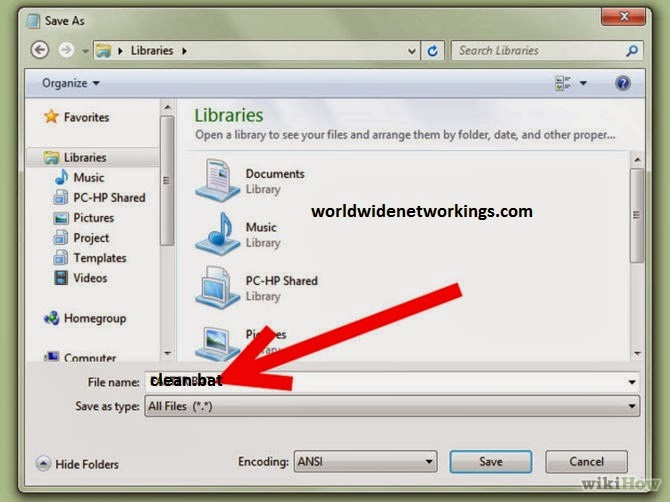
2. Save as Clean.bat.


Important Note : 
After saving you can run the batch file anytime you want to clean the temp files. To make the batch file easily accessible from run command copy the batch file to "C:\Windows". After copying you can run the batch file from run command by entering the batch file name into run command.

Read More

HOW TO CHECK IF YOUR COMPUTER WAS USED IN YOUR ABSENCE

Posted by h

Computer used in your absence 

Every has intension to no wheather any one used your personal computer when you are in absence.one day my cousins came to my home that day i got a fever and i admitted in the hospital for two days.when i return to my home i opened my computer which is free from lock.I got a doubt that anyone used my pc while iam in absence,because someone change date and time in my pc,and they removed some of my photos.I want to check whether really someone used my pc by or else myself i changed it.I want to know whether really someone used my pc or not,But how to check it.Then later i found a trick to check whether anyone used my computer in my absence.In these article iam sharing that trick with you.Just follow below simple steps.  
                         

Follow these steps
            
1. Go to Run and type eventvwr.msc in the Run dialog box.
2. Events are stored in three log files: Application,Security, and System. These logs can be reviewed and archived.
3. For our purposes we want the System log. Click on “System” in the left-hand column for a list of events.
4. Look for a date and time when you weren't home and your computer should have been off.
5. You can also use this log to see how long someone was on the computer.
6
. Just look at the time the computer was turned on and off for that day.

Thats all friends you are done.feel free to ask any queries through your comments.we appreciate your comments.
Read More